
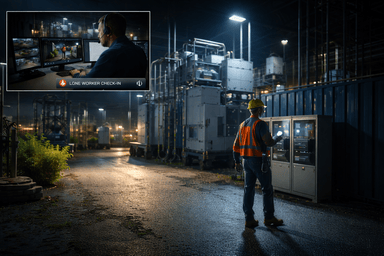
When the day shift clocks out, risk does not. Back lots get quiet. Remote gates see unplanned visitors. Maintenance teams work alone near energized equipment. Relying on cameras that only record is not enough. You need a response layer that can see, speak, and act in real time.
Remote guards deliver that layer. By pairing remote video monitoring, analytics, two way audio, and clear runbooks, manufacturers can protect unmanned zones and lone workers without adding fixed overnight posts. This guide explains how remote guarding works, where it delivers the most value, and how to roll it out alongside your factory access control and plant surveillance systems.
l
l
What remote guarding actually does after hours
Remote guarding blends three capabilities.
- Detection
Human and vehicle analytics, line crossing rules, and sensor inputs notify an operator when something meaningful happens. - Verification
A trained operator reviews live video instantly, checks nearby cameras, and uses context like recent badge events or license plates. - Intervention
The operator issues a live talk down over speakers, turns on lights if available, and follows a site runbook for escalation or dispatch.
You move from passive recording to active prevention, which is the goal of any modern safety system for manufacturing.
l
l
Why unmanned zones and lone workers need special protection
Unmanned zones
The places no one walks at night are often the most vulnerable. Fence lines behind warehouses, roof access points, tank farms, tool cages, and trailer yards have valuable assets and limited visibility. A remote guard program lets you see those areas continuously and deter problems before they spread.
Lone workers
Maintenance techs, instrument specialists, or operators on skeleton crews face elevated risk. A slip, electrical issue, or medical event can go unnoticed. Live check ins and visual verification give supervisors confidence that the person is safe and working in the right zone.
l
l
High value after hours use cases
- Perimeter and fence lines
Detect climbing, cutting, or loitering before entry occurs. Live audio warnings are highly effective deterrents. - Vehicle gates and dock areas
Resolve tailgating, unknown plates, and off schedule arrivals with LPR links and operator verification. Keep queues short at first shift. - Fuel, chemical, and tank farms
Monitor restricted zones and use talk down to stop unauthorized entry. Tie alerts to access control so doors or gates do not open during a verified threat. - Roof and mechanical yards
Protect chillers, compressors, telecom cabinets, and generators that are costly to repair and easy to tamper with. - Lone worker rounds
Scheduled visual check ins confirm location and condition. If a check in is missed, operators escalate per your protocol.
l
l
How remote guarding integrates with your existing systems
- Factory access control
When a door forces open after hours, nearby cameras call up automatically. Operators verify and issue a warning. If the risk persists, the operator locks interior doors by zone according to your policy. - License plate recognition
Unknown vehicles trigger review. Scheduled carriers are verified and directed to the right door. Exceptions are logged to a case file. - Alarms and sensors
Fence vibration, gate position, motion beams, and environmental sensors can all trigger video call ups and operator action. - Incident management
Synchronized clips, door events, and operator notes create a clean record for EHS, HR, and insurance.
l
l
Lone worker protection workflow
- Worker begins a permitted task and checks in by badge or app
- Operator opens the associated camera view and confirms PPE and location
- Timed safety pings require a response at agreed intervals
- If a ping is missed, the operator calls the worker, then the supervisor, then dispatch if no contact is made
- All touchpoints are logged with time stamps and video bookmarks
This approach is simple, auditable, and respectful of the worker’s time.
l
l
Designing the site architecture
- Cameras
Frame approaches, gates, ladders, and cages. Avoid backlight glare. Use proper illumination for accurate analytics at night. - Analytics
Use people and vehicle classifiers rather than raw motion. Add line crossing at fence lines and zone entry rules around sensitive areas. - Audio
Place speakers where voices carry. Preload short prompts by zone. Test gain levels so speech is clear. - Connectivity and power
Provide UPS for switches, cameras, and audio. Consider LTE failover for the monitoring path. - Views and maps
Give operators a simple live floorplan with device icons and quick actions. Keep icons consistent with your access control naming.
l
l
SLAs and runbooks that make remote guarding work
Service levels
- Time from alert to eyes on video
- Time to first live talk down for verified trespass
- Escalation timing to on call contacts and law enforcement
- Case closure with clips and notes within a defined window
Runbooks
Write one page steps for the top scenarios. For example, perimeter breach after hours.
- Confirm human presence on the primary camera
- Issue live warning on nearest speaker
- If subject remains, repeat and bring lights to full brightness
- Notify on call contact and roving guard per phone tree
- If behavior suggests theft or tampering, request police response
- Bookmark clips, record actions, and close the case
l
l
Reducing false alarms without missing real threats
- Mask roads and tree lines that create motion noise
- Tune analytics for time of day and risk level
- Pair analytics with a second input at high risk lines, such as a fence sensor
- Review exceptions weekly for the first month, then monthly
- Maintain a clean allowlist for plates and scheduled arrivals
l
l
Measuring success and ROI
Track outcomes that matter to operations and finance.
- Intrusions deterred by live audio
- Tailgating attempts prevented at the gate
- Exceptions resolved without an onsite roll out
- Lone worker check ins completed and escalations handled within target time
- Downtime avoided due to early intervention
- Investigation hours saved using case files with linked clips and logs
Report these alongside camera health, audio tests, and response times to show system readiness and real results.
l
l
Implementation checklist
- Map unmanned zones, lone worker tasks, and after hours routes
- Confirm camera placement, lighting, and retention targets
- Install speakers where live warnings will be heard
- Enable analytics and test with live walk and drive throughs
- Write runbooks and publish SLAs with contacts and phone trees
- Pilot for 30 to 60 days on two scenarios, then expand
- Review metrics, tune rules, and formalize monthly reporting
l
l
How SSP helps
SSP designs and operates remote guard programs tailored to manufacturing facilities. We audit your current plant surveillance systems, identify the right incident set for after hours risk, deploy or repurpose cameras and audio, enable analytics, and integrate with factory access control and LPR. We also set SLAs, write runbooks, and build dashboards that quantify results for leadership.
Learn how SSP helps manufacturers protect operations, people, and property.

