
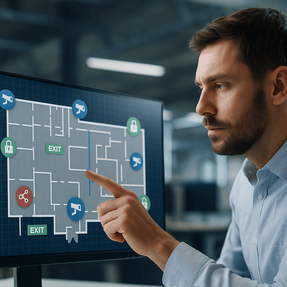
Most plants already have pieces of a digital twin without calling it that. You have cameras with maps, access control door groups, sensor dashboards, and evacuation routes. The problem is that these pieces usually sit in separate systems. During an incident, teams bounce between screens and phone calls while time slips away.
A security and EHS focused digital twin brings those pieces together on a single live floorplan. You see doors, cameras, air quality readings, alarms, and people movement in one view. That means faster decisions during evacuations, clearer investigations, and less confusion for operators.
This guide explains what a digital twin looks like for factory access control, plant surveillance systems, and safety systems for manufacturing, how to build it with tools you likely already own, and which metrics prove the value.
k
k
What is a digital twin for security and EHS
Think of it as a living map of your facility that reflects real conditions in near real time. The twin pulls data from access control, cameras, fire and gas panels, intercoms, environmental sensors, and mass notification. Each device and zone is placed on the floorplan with status, recent events, and quick actions.
On one screen you can answer questions like:
-
Which exits are open, locked, or in alarm right now
-
Where a gas sensor just crossed a threshold and which doors are blocked as a result
-
Which cameras have a current event and the clips tied to it
-
Who just badged into a restricted zone and whether they are certified to be there
-
Where people are mustering and which headcount readers have checked in
This is not a 3D model for engineering. It is a decision tool for industrial site security and EHS response.
k
k
Why manufacturers are adopting digital twins now
-
Faster incident response
A single view reduces radio chatter and screen switching. Supervisors can guide evacuations and lockdowns with confidence. -
Better coordination across teams
Security, EHS, maintenance, and operations see the same information. That reduces contradictory instructions during tense moments. -
Reliable documentation
The twin ties events to locations and assets. You get clean timelines for OSHA investigations, insurer reviews, and internal lessons learned. -
Scalability across sites
Multi building and multi site operations can standardize layouts and response logic, which improves consistency and training.
k
kk
What belongs in the security and EHS digital twin
Start simple and expand in phases.
Core layers
-
Doors and gates from your access control platform with status, schedules, and quick actions to unlock or secure by zone
-
Cameras with health status and instant call ups based on events like door forced open, tailgating, or perimeter breaches
-
Fire and gas sensors with stepped thresholds and recommended actions tied to each zone
-
Mass notification and intercoms to page specific areas, issue voice prompts, or launch prewritten messages
-
Muster points and headcount readers for evacuation accountability even during limited connectivity
Helpful additions
-
HVAC and exhaust states for areas affected by VOCs, particulates, or heat stress
-
Equipment interlocks that prevent energization when a zone is unsafe or under lockout
-
Outdoor layers for yards, rail spurs, tank farms, solar yards, and remote buildings
k
k
How it works during an evacuation
Picture a solvent leak in a finishing room. The sensor trips, the twin highlights the zone in red, and nearby doors automatically shift to no entry. The system suggests the cleanest routes based on current door states and crowding. Cameras at exits pop to the top of the view. Mustering checkpoints show who has scanned in and who has not. Zone paging sends targeted instructions while the map logs every step for later review.
Instead of guessing which exit is clear or relying on hallway calls, you guide people with live information.
k
k
Building the digital twin with what you already have
You do not need to rip and replace. You need an integration plan.
-
Choose the map source
Use current floorplans from facilities as the base layer. Keep the file format simple so updates are easy. -
Normalize your device inventory
Create a list of doors, cameras, sensors, intercoms, and readers with names, IDs, and coordinates. Consistent naming will save you hours. -
Connect the platforms
Integrate access control, VMS, alarm panels, and sensors to a visualization layer or unified security application. Start with read only status if write controls are not ready. -
Place assets and define zones
Drop devices onto the floorplan and group them into evacuation, production, and hazard zones. Link each zone to actions and contacts. -
Add quick actions and runbooks
From the map, allow operators to page a zone, lock or unlock a door group, or acknowledge an alarm. Tie each action to a one page runbook. -
Pilot in one building
Pick a high value area with a mix of assets. Tune icons, colors, and event priorities based on real operator feedback.
k
k
Data governance and privacy that builds trust
Security and EHS data are powerful, so set clear rules early.
-
Access by role
Give operators the views and controls they need without exposing unrelated data. -
Retention policy
Align video, badge logs, and sensor history to your risk classes and regulatory requirements. Keep what you need for audits without letting storage explode. -
Change control
Track floorplan edits and device moves so the twin stays accurate after maintenance or construction. -
Clear purpose statements
Document how analytics, PPE checks, or people counting are used for safety and compliance. Share that with employees to avoid surprises.
k
k
Metrics that show the twin is working
-
Time from alarm to first action
-
Time to clear an evacuation by zone
-
Door prop and tailgating incidents resolved at the door
-
Sensor alarms that resulted in automatic access changes
-
Camera event acknowledgments within service levels
-
Reduction in conflicting instructions during drills captured in after action notes
These numbers support budget conversations and demonstrate value across security, EHS, and operations.
k
k
Common pitfalls to avoid
-
Too much detail on day one
A cluttered map slows operators. Start with doors, cameras, and key sensors. Add more layers after training. -
Inconsistent device names
If a door is Dock 3 on one screen and D3 South on another, you will lose time during an incident. Standardize. -
One person knows how it works
Cross train operators and document the build so the system does not depend on a single admin. -
No tablet or mobile view
Supervisors in the yard or at a muster point need the same view. Plan for responsive layouts and offline headcount options.
k
k
Where this fits within your security and safety strategy
A digital twin does not replace your factory access control or your plant surveillance systems. It gives them a common stage. When you connect devices and rules on a live map, you reduce decision time, strengthen compliance, and make drills and real events easier to manage. It also scales well. Multi site manufacturers can reuse zone templates and runbooks so each facility does not reinvent the wheel.
j
j
How SSP helps manufacturers get there
SSP designs and integrates safety systems for manufacturing that visualize doors, cameras, sensors, and alarms on live floorplans. We inventory assets, normalize names, connect platforms, and build the runbooks that operators actually follow. The result is a practical digital twin that helps your team act faster during evacuations, environmental events, and after hours incidents.
Learn how SSP helps manufacturers protect operations, people, and property.
If you want to see a pilot plan for one building or zone, we can map it and outline a phased rollout that fits your budget and timeline.

