
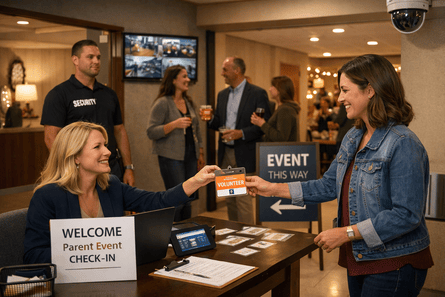
Parent socials, auctions, fun runs, and cultural nights bring energy to a private school campus. They also change the security picture. More guests, more doors propped open, and more activity after dark can create risk if the plan is not clear. The goal is to keep parent association events warm and welcoming while protecting academic areas and sensitive spaces.
This guide gives private and independent schools a simple, respectful approach that uses visitor management, access control, video surveillance, and emergency alerts without turning a community gathering into a checkpoint.
k
k
Principles for respectful security
-
Welcome first, verify fast
-
Open the right doors and keep the rest closed
-
Create visible wayfinding so guests do not need to guess
-
Route alerts to a small on site team with clear next steps
-
Capture clean logs so follow up takes minutes, not hours
k
k
Map the event before you set technology
-
Define the event zone. Lobby, auditorium, gym, quad, or dining hall
-
Mark guest entries and staff entries. Fewer is better
-
Draw routes to restrooms and coat rooms that do not pass through classrooms
-
Identify any high value rooms nearby such as labs, server rooms, and finance offices
-
Assign two or three staff or volunteers to be roving helpers, not guards
A one page map posted at the door and shared with volunteers is more valuable than any single device.
k
k
Visitor management that feels welcoming
-
Use pre registration links in event emails. Faster check in, cleaner roster
-
Place two check in points. One staffed desk and one self service kiosk
-
Scan ID for adult volunteers and vendors. Print badges with name, role, and color zone
-
Add a discreet visual clock or printed expiry on volunteer badges for closing time
-
Train greeters to smile, hand a badge, and point to the route. Audit the roster later
k
k
Access control that supports the event
-
Set time based door schedules so only the event entry and interior route unlock
-
Keep academic wings on a locked schedule. Post simple signage at those doors
-
Issue time limited mobile credentials to event leads and facilities staff
-
Enable door prop alerts at the perimeter with a short grace period
-
Stage a spare credential at the desk for last minute needs and revoke it at close
k
k
Video coverage where it helps, not everywhere
-
Confirm camera views at the entry, the lobby, and the internal route
-
Add a temporary tile layout for the event on the dashboard so one person can watch quickly
-
Use motion bookmarks in low traffic hallways for easy review the next day
-
Avoid cameras inside the auditorium or dining hall unless needed for theft concerns
-
Post a friendly sign at the entry that states cameras are in use in common areas
k
k
Emergency communication by area
-
Assign mobile panic capability to the event lead and one facilities staff member
-
Use zone based notifications so a lobby incident does not alarm the entire campus
-
Prepare plain language templates for medical emergency, severe weather, and evacuation
-
Keep one duty phone number visible at the check in desk
-
Run a one minute alert test with the on site team before doors open
k
k
Volunteers, vendors, and money handling
-
Pre register volunteers with role selection. Print badges that show role at a glance
-
Require ID scan for vendors. Issue a time limited credential only for the route they need
-
For auctions or concessions, place one camera to view the cash box area and one at the exterior route
-
Use a two person closeout for cash and a short log of amounts and handoff time
-
Escort vendors to storage rooms. Log access with the credential, not a paper key
k
k
Wayfinding that prevents wandering
-
Place simple directional signs from entry to event space, restrooms, and exit
-
Use temporary stanchions or rope to close off classroom corridors
-
If available, use digital signage to show live directions during arrival and short thank you messages at exit
-
Staff one friendly usher at the first decision point after the entry
k
k
Data you can use the next morning
-
Export the visitor list with check in and check out times
-
Pull a door report for the event window to see props and forced attempts
-
Review motion bookmarks for any low traffic corridor alerts
-
Save one short dashboard summary with lessons learned for next time
Clean data makes debriefs faster and helps you improve without adding more rules.
k
k
A simple staffing plan
-
One event lead with mobile panic and authority to call decisions
-
One front desk greeter, one kiosk helper
-
One facilities or operations person with keys and mobile access
-
One roving volunteer focused on wayfinding and guest support
-
One person watching the dashboard during the first hour, then as needed
Small, calm, and friendly beats large and rigid for parent events.
k
k
Quick checklist for day of event
-
Door schedules set. Academic wings confirmed locked
-
Badges and printer ready. Pre registered list loaded
-
Camera tile layout saved on the dashboard
-
Mobile panic assigned to event lead and facilities
-
Signage placed at entry, route, restrooms, and exit
-
Duty phone posted and tested
-
Spare credential staged and noted for revocation at close
k
k
How SSP helps private schools run welcoming events
SSP designs and supports integrated school security systems that fit the culture of private and independent schools. We connect visitor management, campus access control, emergency alert systems, and video surveillance into one simple view. Our team helps you create lobby only routes, set time bound credentials, tune camera views, and train volunteers so your events feel warm and stay secure.

