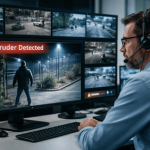

Overnight coverage is expensive, and many city facilities do not generate enough after-hours activity to justify a full guard shift. At the same time, public buildings must deter vandalism, trespassing, and theft while maintaining community trust. Remote guarding combines live video monitoring, analytics, and two-way audio so trained operators can verify events, talk down intruders, and dispatch responders without keeping a guard on site.
This guide explains when remote guarding is the right fit for municipalities and how to design a program that aligns with government facility security systems, strengthens public building surveillance, and complements secure access control for city buildings.
k
k
What remote guarding includes
-
Live video monitoring during defined hours, typically nights and weekends
-
AI analytics for motion, loitering, line crossing, door props, and vehicle events
-
Audio talk down through network speakers to warn and direct individuals
-
Verified dispatch with clear criteria and packaged video for responders
-
Incident documentation with clips, timelines, and operator notes
Remote guarding is not just a camera feed. It is a verified workflow that replaces random patrols with targeted interventions.
k
k
Where municipalities see the most value
-
Civic centers and city halls after public meetings or during construction phases
-
Parks, recreation facilities, and parking lots where loitering and vandalism spike after hours
-
Public works and utilities that store vehicles, fuel, copper, and tools
-
Libraries and community centers with recurring after-hours activity near entrances
-
Courts and administrative buildings that need deterrence without an on-site presence
j
j
Cost and coverage comparison
| Option | Coverage style | Typical costs | Strengths | Gaps |
|---|---|---|---|---|
| Overnight guard on site | Patrol and presence | High fixed labor cost | Immediate physical response | Limited visibility across large sites |
| Drive-by patrols | Periodic sweeps | Moderate recurring cost | Broad area coverage | Long gaps between passes |
| Remote guarding | Continuous monitoring of risk zones | Predictable monthly fee | Real-time detection, audio intervention, verified dispatch | Requires good camera views and audio zones |
Remote guarding often delivers stronger deterrence in the exact hours and areas where incidents occur, at a fraction of full-time guard costs.
k
k
Designing a municipal remote guarding plan
1) Map risk zones and hours
Use incident history to define monitored windows and priority views. Focus on gates, vehicle yards, entrances, loading docks, cash handling areas, and problem corners.
2) Standardize camera views
Ensure clean sight lines, stable mounting, night lighting, and correct focal length. Label cameras with human readable names such as City Hall West Entry or Water Plant Gate 2.
3) Add two-way audio where you expect interventions
Network speakers placed near entries, yards, and gathering spots allow operators to issue warnings and direct behavior.
4) Integrate with access control
Send door prop, forced entry, and after-hours badge events to the video platform. Operators should see the correct door and camera in one step.
5) Define verification and dispatch rules
Write clear criteria for when to use talk down, call a contact, or dispatch police. Avoid vague instructions. Document escalations for repeat offenders and trespass orders.
6) Document the incident workflow
Every handled event should produce a short report with time stamps, actions taken, and video links. These records reduce liability and support public records requests.
k
k
Analytics that actually help
-
Loitering with dwell timers to filter harmless passersby
-
Line crossing and intrusion boxes on gates, fence lines, and building perimeters
-
Vehicle detection for after-hours parking or drive-throughs
-
Door prop and forced-open correlations from access control
-
People counting to flag gatherings that exceed policy after closing
Tune schedules so alerts only fire when areas should be empty. This keeps operator attention on real risk.
k
k
Privacy, policy, and community trust
Remote guarding can be both effective and respectful. Post clear signage that monitoring is in use. Use role based permissions for operators. Redact faces and plates when sharing clips with the public. Set transparent retention periods and keep an audit trail of who accessed which video and when. These measures align deterrence with accountability.
k
k
KPIs to track
-
Incident response time from alert to operator action
-
Talk down success rate percentage of events resolved without dispatch
-
False alarm rate per camera and per analytic type
-
Repeat incident reduction at monitored zones after 30 and 90 days
-
Cost per resolved incident compared to prior guard or patrol models
Share a one page monthly summary with leaders so they see outcomes, not just activity.
k
k
Common pitfalls to avoid
-
Relying on generic motion alerts that create noise
-
Poor night lighting that undermines identification
-
No audio path, which removes the strongest deterrent tool
-
Cameras with overlapping or mislabeled views that slow operators
-
Missing integration with doors and alarms, which hides context
A short commissioning checklist and quarterly tune ups keep performance high.
k
k
The bottom line
Remote guarding gives municipalities continuous after-hours protection, credible deterrence through live audio, and verified dispatch supported by video. When paired with good lighting, clear policies, and integrated access control, it outperforms traditional overnight staffing at a predictable cost.
k
k
Ready to evaluate remote guarding for your facilities
See how SSP helps government agencies protect their people and infrastructure with monitored video, talk down audio, and verified response. We can design a site plan, run a pilot, and deliver a clear cost and outcomes comparison.